
本站对 Hexo Butterfly 主题的定制化修改
本站对 Hexo Butterfly 主题的定制化修改
本站目前使用的是 Butterfly 5.7.0 ,然后本文是记录我自己做了哪些代码层面的修改。
本人一般注释掉冲突的原文本,然后加上自己加入的文本,下面的代码就都这么记录了。
本文不会与本站最新的方案修改方案保持一致,就是说很小的改动不一定会写在这,请各位自己摸索
标签页设计修改
原来五颜六色的标签看得我眼睛都花了。
效果
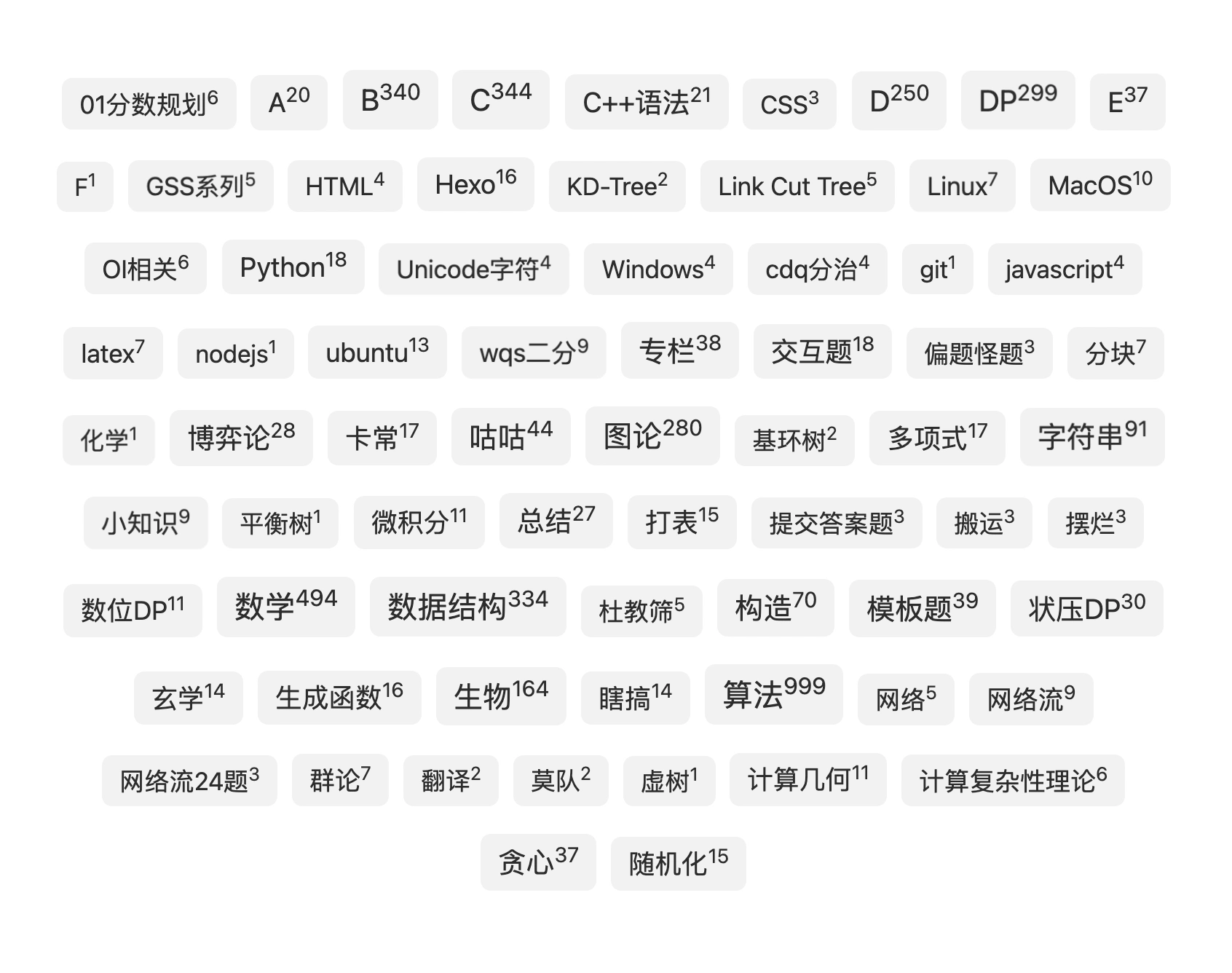
修改了 /themes/butterfly/scripts/helpers/page.js
中的以下段落,也可以换成彩色字体。
const getRandomColor = () => {
  const r = Math.floor(Math.random() * 201)
  const g = Math.floor(Math.random() * 201)
  const b = Math.floor(Math.random() * 201)
  // return `rgb(${Math.max(r, 50)}, ${Math.max(g, 50)}, ${Math.max(b, 50)})`
  return `rgb(${Math.min(r, 200)}, ${Math.min(g, 200)}, ${Math.min(b, 200)})`
}

const normalizeColors = input => {
  if (!input) return null
  if (typeof input === 'string') {
    const color = input.trim()
    return color ? [color] : null
  }
  if (Array.isArray(input)) {
    const result = []
    for (let i = 0; i < input.length; i++) {
      const value = input[i]
      if (value === null || value === undefined) continue
      const color = String(value).trim()
      if (!color) continue
      result.push(color)
    }
    return result.length ? result : null
  }
  return null
}

const userColors = normalizeColors(custom_colors)

const generateStyle = (size, unit, page, color) => {
  // const colorStyle = page === 'tags' ? `background-color: ${color};` : `color: ${color};`
  const colorStyle = page === 'tags' ? `background-color: rgb(244, 244, 244); color: ${color};` : `color: ${color};`
  return `font-size: ${parseFloat(size.toFixed(2))}${unit}; ${colorStyle}`
}

return source.sort(orderby, order).map((tag, idx) => {
  const ratio = length ? sizeMap.get(tag.length) / length : 0
  const size = minfontsize + ((maxfontsize - minfontsize) * ratio)

  if (userColors && userColors.length) {
    const color = userColors[idx % userColors.length]
    const style = generateStyle(size, unit, page, color)
    // return `<a href="${env.url_for(tag.path)}" class="tag-cloud-item" style="${style}">${tag.name}</a>`
    return `<a href="${env.url_for(tag.path)}" class="tag-cloud-item" style="${style}">${tag.name}<sup>${tag.length}</sup></a>`
  }

  // const color = getRandomColor()
  // 随机字体颜色选上面那行,固定颜色选下面这行
  const color = `rgb(75, 75, 75)`
  const style = generateStyle(size, unit, page, color)
  // return `<a href="${env.url_for(tag.path)}" style="${style}">${tag.name}</a>`
  return `<a href="${env.url_for(tag.path)}" style="${style}">${tag.name}<sup>${tag.length}</sup></a>`
}).join('')
修改公告栏的小喇叭图标
这个会动的小喇叭图标看得我浑身不舒服,因此我改成了静态的。
找到
themes/butterfly/layout/includes/widget/card_announcement.pug
这个文件本来长这样(防止各位以及我自己忘记怎么改回来)
if theme.aside.card_announcement.enable
  .card-widget.card-announcement
    .item-headline
      i.fas.fa-bullhorn.fa-shake
      span= _p('aside.card_announcement')
    .announcement_content!= theme.aside.card_announcement.content
把这个公告的 Font Awesome 图标后面的动态效果去掉就好啦
if theme.aside.card_announcement.enable
  .card-widget.card-announcement
    .item-headline
      i.fas.fa-bullhorn
      span= _p('aside.card_announcement')
    .announcement_content!= theme.aside.card_announcement.content
关于图标的动态效果,可以查看 Font Awesome 的文档: Animating Icons 。
关闭搜索关键词高亮
这个功能到底是谁想出来的?难道用户不会用 Ctrl + F 吗??
本人修改的办法比较简单,找到
/themes/butterfly/source/js/search/local-search.js
这个文件。
找到下面的语句,我这边是第 161 行,直接注释掉下面第二行。
url = new URL(url, location.origin)
url.searchParams.append('highlight', highlightParam)
如下
url = new URL(url, location.origin)
// url.searchParams.append('highlight', highlightParam)
这样就会关闭搜索的时候的那个 ?highlight=key
,这下舒服了。
当然,带有这个语句的链接依旧可以高亮,如果各位哪天又想加回来,只需要把上面的注释取消就行了。
本博客所有文章除特别声明外,均采用 CC BY-NC-ND 4.0 许可协议。转载请注明来源 Q779’s Blog!


